Softwares overview
Terms of Use
All software listed on this webpage is free to use. Some have their source code available for modification, while others provide only the executable, possibly accompanied by DLLs. If the source code is not available, it is likely because the software is part of a larger project that will evolve into a product in the future.
Softwares
IDK Parser
Description
IDK Parser is a Windows command-line tool that lets you check IDK files, view error messages, and convert them into HTML files. It can generate a valid HTML website; in fact, this very website was built using it.
Additional ressources
- .Direct download: idk_parser_alpha_win64.zip:
- .Detailed instructions on how to write IDK file format can be found in IDK's documentation.
- .For usage instructions, refer to the IDK's readme.
- .Technical insights: IDK's technical side.
Image converter
To see the image in full resolution, right click on the image > "open in new tab"
Download
Description
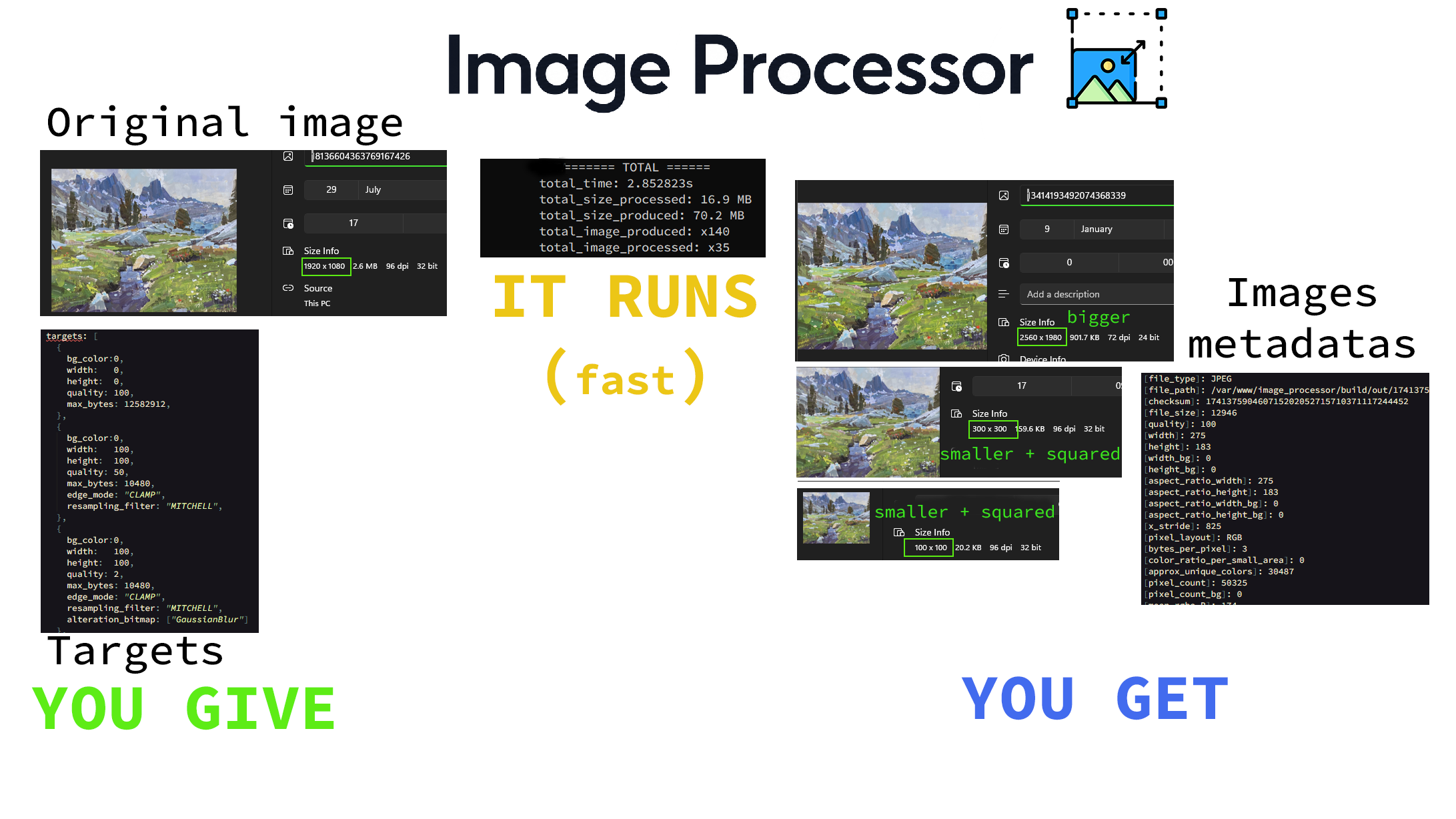
This command-line program will convert PNG and JPEG files to selected targets. It uses available threads and SIMD for image manipulation and compression.
It retrieves details about the original image file and converted images, written to a file_name.metadas file, which can be used to fill a database, for example.
It has no real limitation about the image resolution it can convert, the limitation comes from the STB library which set it to very, uncommon resolution.
History
In my project, I needed a fast image converter that runs on a light computer (1 vCPU and 1 GB RAM). I was not happy with the poor performance of Go image packages and decided to create one in C using STB image. STB is very simple source code; it uses SIMD, and you can tweak it enough to fit your project. I wanted to try out if the gain was real. Results were better and promising.
Limitations
Being simple, it means that PNG images are not well compressed (uses zlib). To counter that, the program uses libdeflate source code, which compresses PNG files better but not as effectively as several PNG libraries.
It is unable to produce a 16-bit per channel image, which is uncommon, but it will decode it and produce the 8-bit per channel equivalent.
Configurations
If not provided, the program uses the default target, but you can change that by modifying the targets.kn file.
Dependencies
STB_image.h, STB_resize2.h, STB_write.h, and libdeflate (for PNG compression).
Platforms
Windows and Linux.
How to use it
Security
The program is able to know when a file is not fully present (while moving/copying state) and will wait until it does.
Parameters
in="path_folder_image_in"OPTIONAL: the program will listen to the folder and process image conversion as it finds files.out="path_folder_image_out"OPTIONAL: folder path where the converted images will be placed. Default is./out, creating it if missing.targets="path_custom_targets"OPTIONAL: file path of custom image targets (conversion). Otherwise, default ones are used.thread=numberOPTIONAL: override the default: normally the program base the thread count from the logical core count.
Examples
image_processor_alpha_win64 in="./my_folder_path_in" out="my_folder_path_out" targets="my_file_targets_path" thread=2.image_processor_alpha_win64 in="./my_folder_path_in".
Notes
- If target has a bg_color with non-opaque alpha channel (< 255), the image will be PNG.
Current State
The program is currently in alpha and may break in certain situations. This is a first version, and work must be done before calling it production-ready. I personally use it on a project, though.
Work needs to be done to make it a bit more performant. When multithreading is available, the performance is good enough, but on a single-core CPU it can be improved.
TODOS
- Better bitmap analysis, which will improve automatic image type detection (JPEG/PNG) depending on the pixels.
- Add the possibility to specify
Best_Compressionon image targets, which will emphasize smaller file size over visual quality. - Better error messages.
- Possibility to redirect print messages to the metadata file.
- Better fatal error handling.
- Retry conversion when file bytes exceed the target's max_bytes.
- Add Mipmap production capability.
- GPU driven code, not sure we want that but we could delegate some calculation to the GPU, we must think about the negative side of bringing it to the project (size, bugs and more).
- Add two modes, one that will delete file as they are converted (currently available) and one which will NOT delete them but trigger conversion when they are modified.
- Permit a `delete` flag which will tell the program to not delete processed image or image which cannot be processed.
Source code LOC
| Language | Files | Lines | Code | Comments | Blanks |
|---|---|---|---|---|---|
| C | 90 | 35117 | 27856 | 3939 | 3322 |
| C Header | 101 | 47495 | 34404 | 7038 | 6053 |
| Total | 191 | 82612 | 62260 | 10977 | 9375 |
Note that a lot of code is duplicated (for example different channel count bitmap) and we did not clean useless code. This is the first draft and LOC can be improved a lot, consequently file size.